How to Set Up Call Forwarding on Callmins
Forward calls from your Callmins UK or US number to your mobile or landline. Follow the setup steps, check international rates, and learn how billing works.
Get a numberUK & US numbers from $2.00/month
Need a UK or US number? Get one from $2.00/month, no SIM →
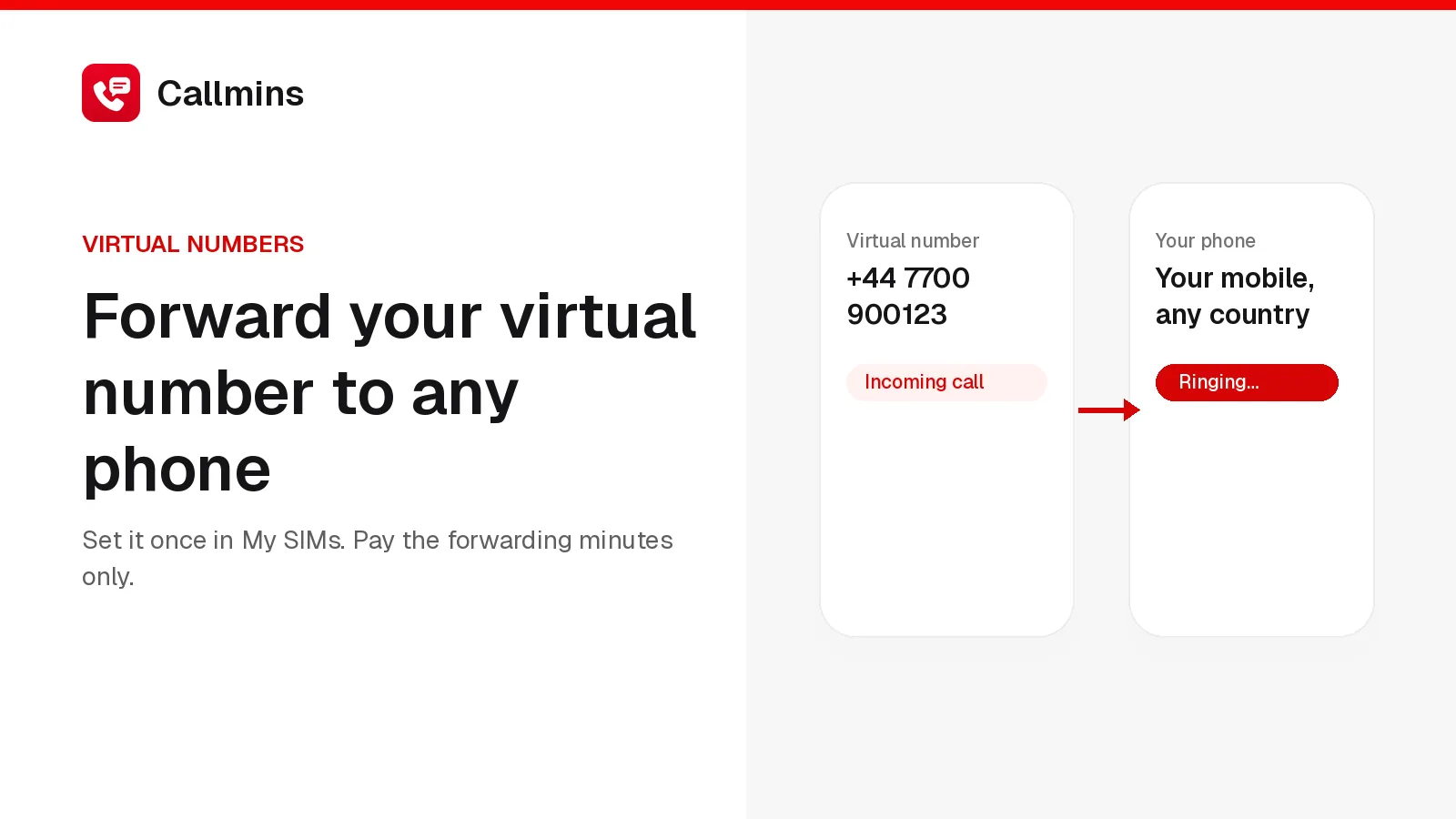
To set up call forwarding on Callmins, sign in and open My SIMs, choose your active UK or US number, and expand Call forwarding. Enter the phone you want to receive calls on, select Check rate, then choose Enable forwarding at this rate. Wait for the confirmation before testing a call.
This guide is for people who want calls to their Callmins UK or US number to ring on an existing mobile or landline. Eligible international destinations are supported. Forwarding is available from UK mobile and geographic landline numbers and US local numbers. Canadian source numbers are not enabled in this release.
Before you start
- An active UK mobile/landline or US local Callmins number that you own, with a Ready status.
- A mobile or landline that can receive ordinary phone calls.
- The destination in international format: + followed by the country code and phone number.
- Wallet credit for at least one minute at the quoted forwarding rate.
If you do not have a number yet, follow our virtual number setup guide. If a number is shared with your account, ask its owner to configure forwarding. A shared member cannot change another person's routing.
How to set up call forwarding on Callmins
1. Open your numbers
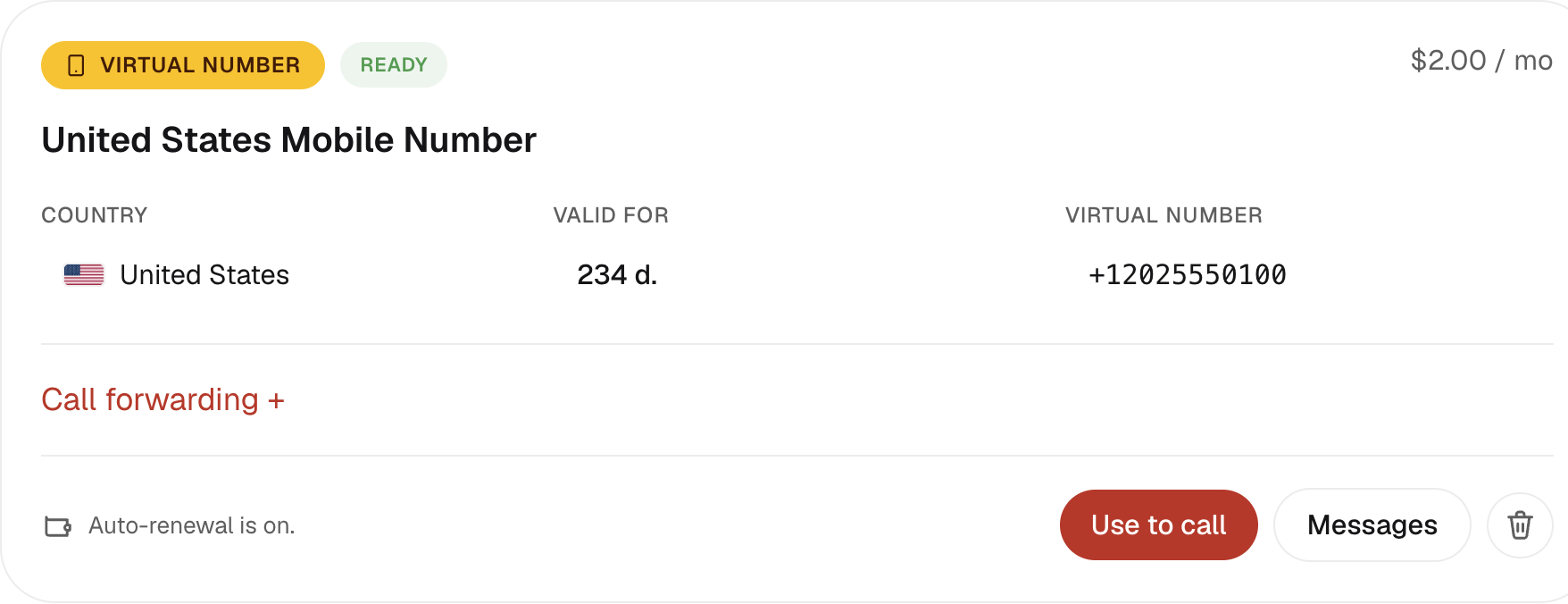
Sign in to Callmins and open My SIMs. The desktop navigation may label this section My plans. Find the card containing the UK or US number that people call you on.
2. Expand Call forwarding
Select Call forwarding +on that number's card. Check that you selected the right number if your account has more than one. If the panel says forwarding is awaiting service setup, stop here: you cannot enable it for that number yet. Contact support for availability.
3. Enter the phone you want to ring
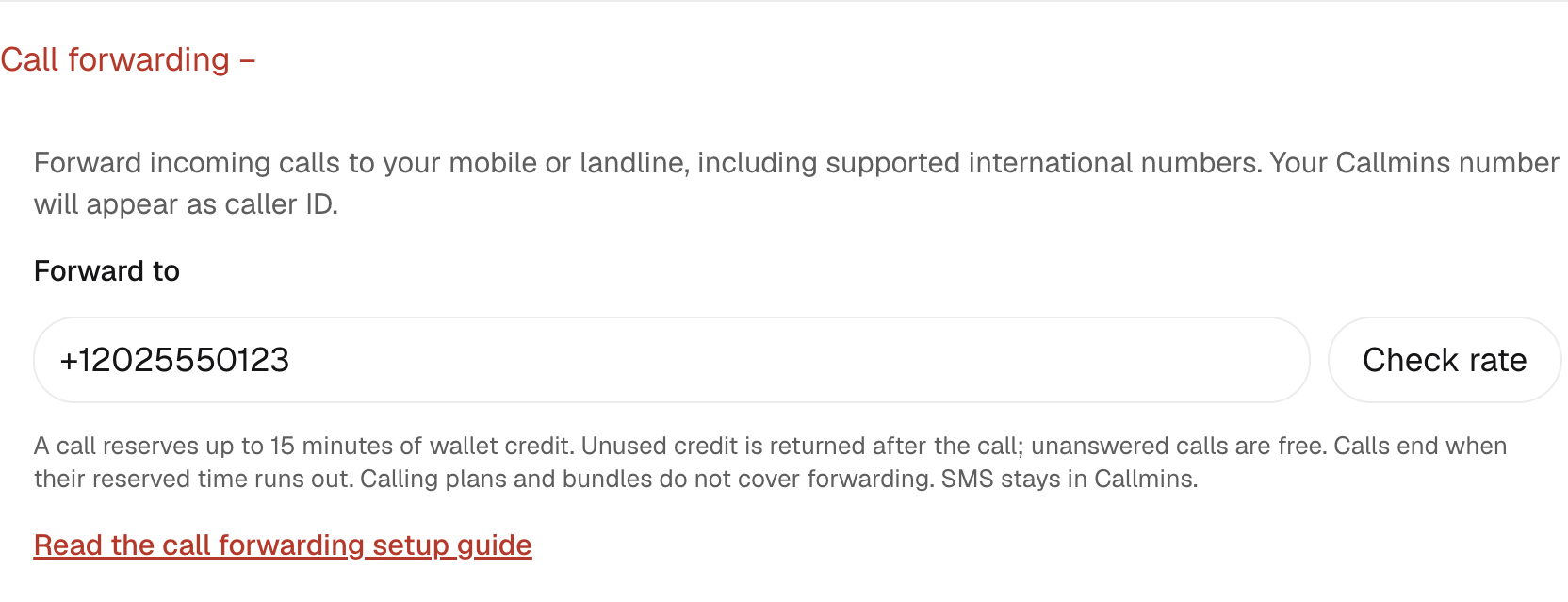
In Forward to, enter your existing mobile or landline in full international format. Start with +; do not enter an extension, a short code, or a SIP address. Choose a regular external mobile or landline, rather than another Callmins number, a premium-rate number, or a toll-free number.
4. Check the rate
Select Check rate. The panel displays the destination and a price per minute. Read this quote before continuing: an international mobile may cost more than a US destination, and two numbers in the same country can have different rates.
5. Enable forwarding
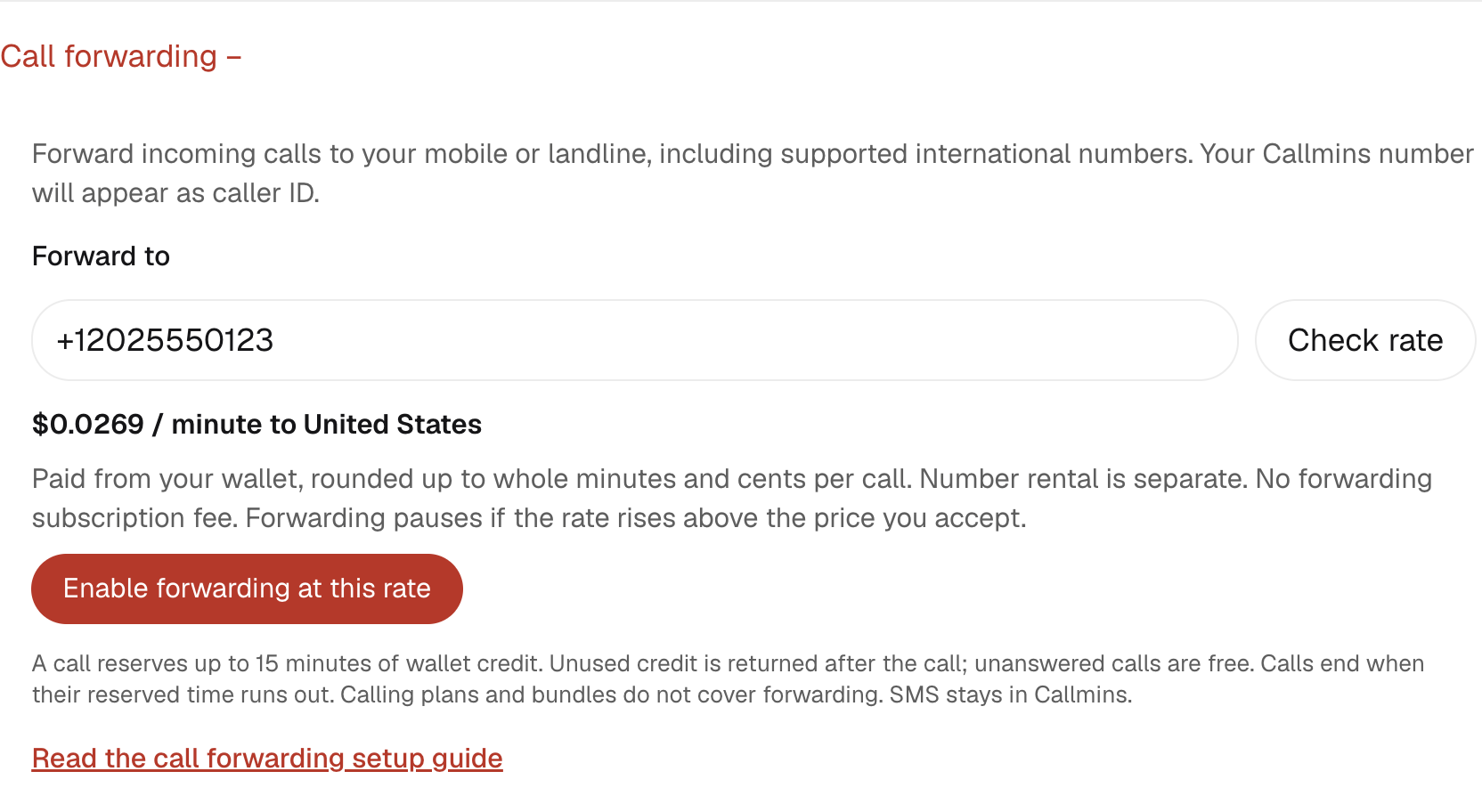
Select Enable forwarding at this rate. Wait until Callmins confirms that calls to your number will forward to the destination you entered. Entering a number or checking its price alone does not activate forwarding.
6. Make a test call
Use a different phone to call your Callmins UK or US number. Answer on the destination phone and check that you can hear each other. Your destination phone should display the original caller’s number when available; the receiving carrier controls the final display. After hanging up, check your wallet activity for the released credit and the final call charge.
Once enabled, all incoming calls to that number go to the saved destination. You do not need to keep the Callmins app or browser open for them to reach your phone. Your destination still needs its usual mobile or landline service.
How to forward calls to an international mobile
Follow the same steps whether your phone is in the US or abroad. Enter its own country code, not the country code of the Callmins number. The destination quote checks whether forwarding to that country is available on your account.
| Phone country | Format to enter | Example conversion |
|---|---|---|
| United States | +1 and the 10-digit number | 202 555 0123 → +12025550123 |
| United Kingdom | +44 and the number without its leading 0 | 07… → +447… |
| Pakistan | +92 and the number without its leading 0 | 03… → +923… |
These show formatting, not a promise that every number or network is supported. Enter your real destination and use Check rate for confirmation. Your mobile provider may also apply its normal incoming-call or roaming charges.
How much does call forwarding cost?
Forwarding is charged separately from the monthly number rental. There is no additional forwarding subscription fee. The rate depends on the complete destination number, and your wallet pays for connected calls; calling plans and minute bundles do not cover forwarding.
A typical US-to-US forwarding quote is currently $0.0269 per minute. This is an example, not a universal international rate. Always use the price displayed for the number you enter. A typical UK-to-US quote is $0.0294per minute. Both the Callmins number you forward from and the destination affect the price. If its rate later rises above the price you accepted, forwarding pauses until you check and accept a new quote.
Example: a call lasting 1 minute and 1 second
Callmins rounds 61 connected seconds up to 2 minutes, multiplies that by the accepted per-minute rate, then rounds the final amount up to whole cents. At $0.0269 per minute, that call costs $0.06. An unanswered forwarding attempt has no customer call charge.
Why you see credit reserved before the call ends
Before connecting, Callmins reserves enough available wallet credit for up to 15 whole minutes. At the sample US rate, a full 15-minute reservation is $0.41. A smaller available balance buys a shorter call. The call ends when its reserved time runs out.
After the call, the reservation is released and actual usage is charged. Unused credit returns to your available balance. Wallet activity shows the reservation, its release, and the final usage separately; the reservation is not an extra charge on top of the call. Keep enough credit for both your number renewal and your calls.
Change the destination or turn forwarding off
To change phones, return to the same number's Call forwarding panel, enter the new destination, select Check rate, and enable forwarding at the new price. Wait for the confirmation and test the new destination.
To stop forwarding, select Turn forwarding off and wait for the confirmation. New incoming calls will ring in Callmins again. You keep your number, and its normal rental continues. You do not need to release or cancel the number.
Call forwarding troubleshooting
| What you see | What to do |
|---|---|
| No forwarding control | Check that you own the number and its status is Ready. Shared members cannot configure it. |
| Awaiting service setup | That number is not enabled for forwarding yet. Contact support; checking a rate cannot activate an unavailable service. |
| Invalid or unsupported destination | Include + and the country code. Remove the local leading 0 where appropriate and any extension. Use an eligible external mobile or landline. |
| Calls do not reach your phone | Check the saved destination, the activation confirmation, your available wallet balance, and whether the destination phone can receive a normal call. |
| Rate changed | Select Check rate again and review the new price before enabling forwarding. |
| Carrier change could not be confirmed | Retry enabling at the checked rate, or choose Turn forwarding off to restore calls in Callmins. Wait for confirmation before relying on the change. |
| Credit is still reserved after a call | If the final charge has not appeared and credit remains held, contact support with the Callmins number and call time so the call can be checked. |
When asking support for help, include the Callmins number, the destination's country, the time of your test call with its time zone, and the exact message shown in the panel. This helps us identify the correct call.
Common questions
Can I forward a Callmins UK or US number to an international mobile?
Yes, if your destination is supported. Enter the mobile number with + and its country code, then choose Check rate. Callmins checks the destination before activation. Prices vary by country and number; use the quote for the complete number you want to receive calls on.
Is call forwarding included in my monthly number rental?
No. The rental keeps your number active; forwarding has a separate per-minute wallet charge. A typical US-to-US forwarded call currently costs $0.0269 per minute. Calls round up to whole minutes and then whole cents. Check your destination's rate before enabling forwarding.
Does the Callmins app need to stay open?
No. Once forwarding is enabled, incoming calls are routed to the external number you saved. That phone must be reachable through its normal telephone network. You still need access to your Callmins account to change the destination, check your balance, or turn forwarding off.
Will SMS messages also be forwarded?
No. This setting forwards voice calls only. Text messages sent to your Callmins number stay in your Callmins Messages inbox. Enabling or disabling call forwarding does not change where you receive SMS messages.
Can I forward only unanswered calls?
The current setting forwards all incoming calls to the saved destination. It does not offer a schedule, simultaneous ringing, or forwarding only when unanswered. Turn forwarding off when you want calls to ring in Callmins again.
Does forwarding need manual activation by support?
For an eligible number with forwarding available, its owner can activate it directly in My SIMs after checking the rate. If the panel says the number is awaiting service setup, forwarding is not available for that number yet. Contact support rather than assuming the setting is already active.
Ready to route your calls? Open My SIMs, select your UK or US number, and check the forwarding price for the phone you want to ring.